Blender Addon "Bermudes Tools"
Description
Addon "Bermudes Tools" provides set of tools for procedural geometry generation and modification.
List of tools:
- Plate Surface - covers surface of the active object by "plates".
- Scattering Tool - scatter objects on active object surface.
- Morph Tool - morphs active object to another one (objects can have different topology).
Supported Blender version 3.2+.
Installation
Before install new version of addon the previous version must be uninstalled.
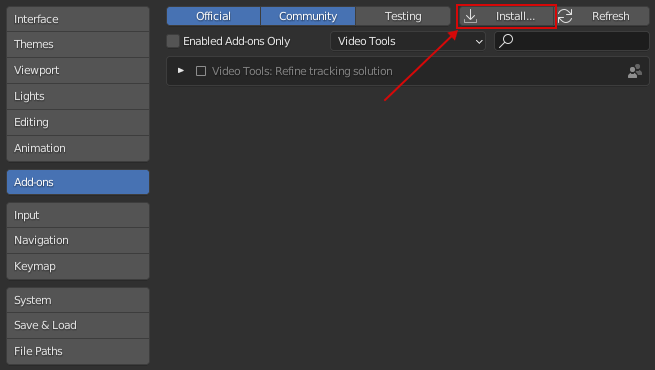
The installation process is the default process for Blender: Edit > Preferences > Add-ons > Button "Install" > Select .zip-file of the addon
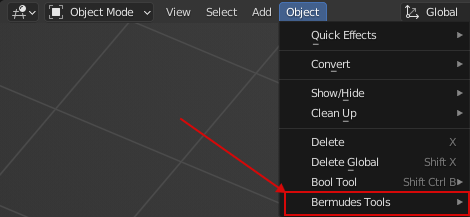
After installation and enabling the addon, menu with tools will appears in "Object" menu of the 3D viewport.
Tools
Tool "Plate Surface"
Covers surface of the active object by "plates". The "plates" can be hard surface plates or organic blobs or something intermediate (stones for example).
The tool works in object mode and applicable to mesh objects and curves. After applying tool on object, in modifier stack will be added modifier with configurable parameters.
Parameters
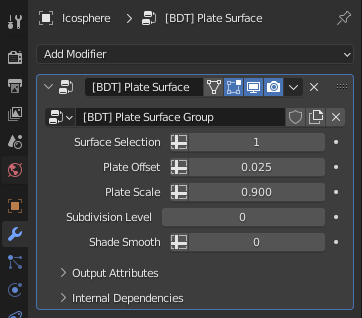
Surface Selection
Defines which part of geometry will be modified. By default selected whole object. It's possible to select specific vertex group by clicking on cross icon and selecting needed vertex group in list.
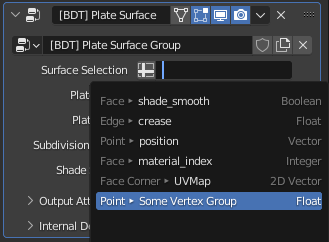
Plate Offset (Inset)
Defines how much the plates will be extruded from the surface. The value can be negative, so plates will be inseted to the surface.
Plate Scale
Defines the scale of the top side of plate. This parameter can be used to make plates more flatten or spiky.
Subdivision Level
Defines the subdivision level of geometry. Useful for generating more smoothed and detailed geometry. By default disabled (value 0).
Shade Smooth
Defines the mode of shading - Smooth or Flat. Useful for estimation of how the model will be looking in different modes.
Tool "Scattering Tool"
Scatter objects on surface of the active object.
The tool works in object mode and applicable to mesh objects and curves. After applying tool on object, in modifier stack will be added modifier with configurable parameters.
Parameters

Scattering objects
Collection with objects that will be scattered on surface.
Min distance
Defines min distance between scattered objects. This parameter allow to avoid overlapping of scattered objects.
Global distribution density
Defines distribution density globally on whole surface.
Local distribution density
Defines distribution density on specified part of surface. Specific part of surface can be defined by vertex group. To select vertex group need to click on cross icon and select needed vertex group in list.

The "Weight Paint" mode can be used to define distribution density.

Distribution seed
Defines the randomization seed of the distribution. Can be used for "rescatter" objects.
Rotation randomization factor
Defines the randomization factor of the rotation by z-axis of scattered objects.
Scale randomization: min/max
Defines the range of scale randomization from min to max. By default scale randomization turned off - min and max set to 1.
Shade Smooth
Defines the mode of shading - Smooth or Flat. Useful for estimation of how the model will be looking in different modes.
Tool "Morph Tool"
Morphs active object to another one. The objects can have different topology.
The tool works in object mode and applicable to mesh objects and curves. After applying tool on object, in modifier stack will be added modifier with configurable parameters.
Parameters

Morph Object
The object to which active object will be morphed.
Morph Factor
Defines the strength of morphing. It's possible to select vertex group (by clicking on cross icon) to morph only specific part of object.

The "Weight Paint" mode can be used to adjust strength of morphing.

Shade Smooth
Defines the mode of shading - Smooth or Flat. Useful for estimation of how the model will be looking in different modes.
Release Notes
Version 1.2.0 (2022-08-11)
- Added tool "Morph Tool"
Version 1.1.0 (2022-08-03)
- Added tool "Scattering Tool"
Version 1.0.0 (2022-07-30)
- Initial release